Finding cr3 & reading virtual addresses for all processes inside a QEMU Windows Guest
Finding cr3 & reading virtual addresses for all processes inside a QEMU Windows Guest
Note: you can view the source code **here* to get a context for all structures referenced.
Following on from the last blog post - we were able to create a dump of our windows virtual machine running under QEMU. This successfully targeted the correct memory mapping and dumped both low & high memory ranges to a file and verified this was correct from a successful analysis with volatity.
With this context we can now write a C function to read physical memory from a given memory address in a live environment. This is done using the following logic:
1
2
3
4
5
6
7
8
9
10
11
12
13
14
15
16
17
18
19
20
21
22
23
24
25
26
27
28
29
30
31
bool qvmi_read_phys(struct qvmi_os_instance *os_instance, void *physical_address, void *buffer, size_t size)
{
    struct iovec local = {buffer, size};

    // handle low memory region address
    if ((uint64_t)physical_address <= 0x7fffffff)
    {
        struct iovec remote;
        remote.iov_base = (void *)((uint64_t)os_instance->vm_instance.vm_mmap.start + (uint64_t)physical_address);
        remote.iov_len = size;

        ssize_t bytes_read = process_vm_readv(os_instance->vm_instance.qemu_pid, &local, 1, &remote, 1, 0);
        if (bytes_read == -1)
            printf("process_vm_readv failed: %s (errno = %d)\n", strerror(errno), errno);
    }

    // handle high memory region address
    if ((uint64_t)physical_address >= 0x100000000)
    {
        struct iovec remote;
        remote.iov_base =
            (void *)((uint64_t)os_instance->vm_instance.vm_mmap.start + 0x80000000 + ((uint64_t)physical_address - 0x100000000));
        remote.iov_len = size;

        ssize_t bytes_read = process_vm_readv(os_instance->vm_instance.qemu_pid, &local, 1, &remote, 1, 0);
        if (bytes_read == -1)
            printf("process_vm_readv failed: %s (errno = %d)\n", strerror(errno), errno);
    }

    return true;
}
Importantly the above C function does not handle the translation of virtual to physical addresses - as such we cannot currently use this to interface with anything in the live windows environment. For this to be possible, the following is required:
| Requirement | Explanation |
|---|---|
| Kernel CR3 value (aka DTB) | The CR3 register gives us the physical address of the PML4 table. Every process has a unique CR3 value because each process has its own unique virtual address space. |
| ntoskrnl.exe base address | The virtual address where ntoskrnl.exe begins in kernel memory. |
| PsActiveProcessHead pointer | PsActiveProcessHead is a doubly linked list containing all EPROCESS structures corresponding to processes. The EPROCESS structure contains a KPROCESS structure labelled as Pcb. (EPROCESS structure). Importantly, this allows us to find the CR3 (labelled as DirectoryTableBase/dtb) for each process. |
| Virtual address to physical address translator | Translates a virtual address to a physical address when given the target process’s CR3. |
To begin, we will use WinDbg for now to provide these values to us. After attaching the local debugger to our kernel, windbg shows both the kernel base & PsLoadedModuleList addresses. We can find PsActiveProcessHead by pasting the following into windbg:
x nt!PsActiveProcessHead
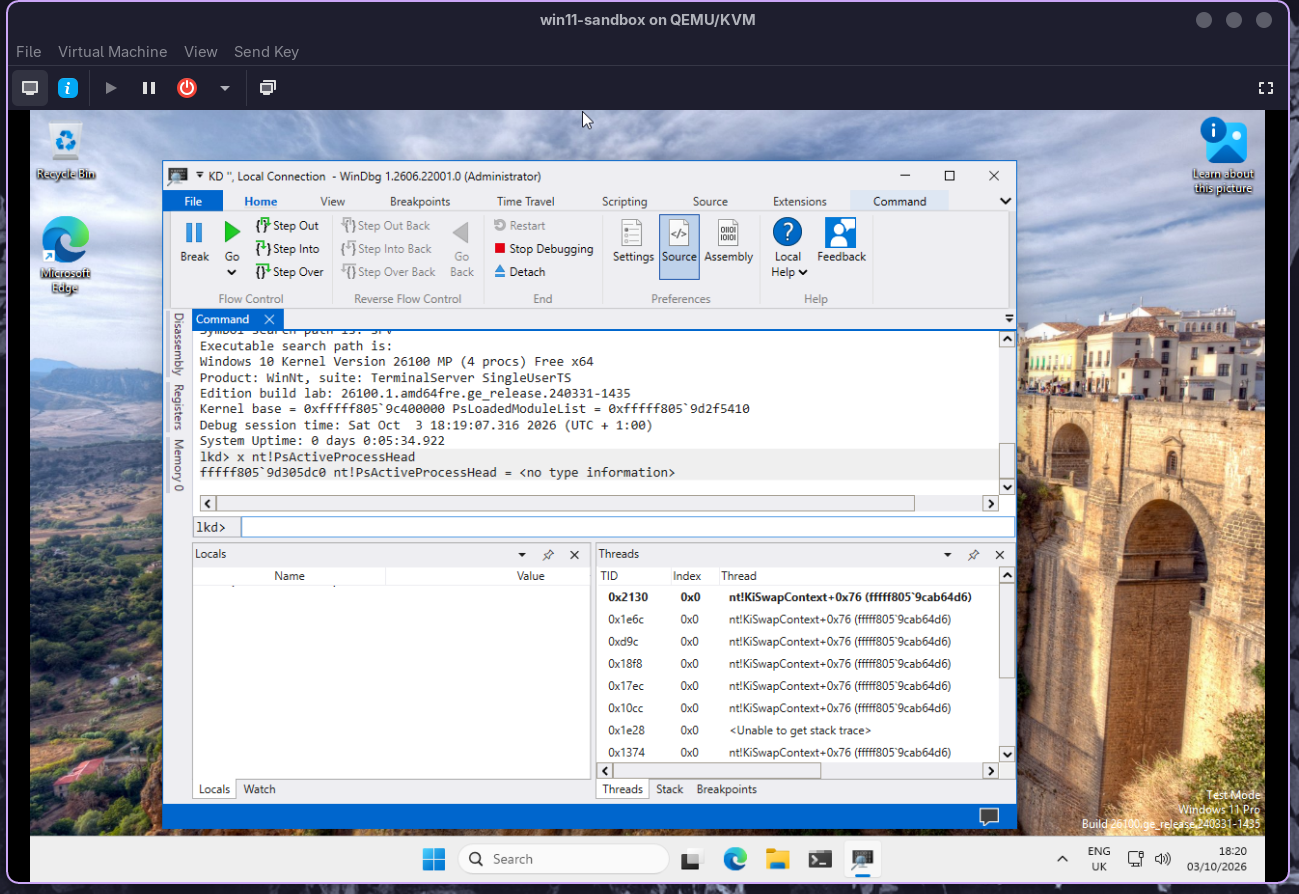
To find our kernel cr3, we can use !process -1 0 after changing the context to our kernel. This will output the DTB (aka cr3) like below.
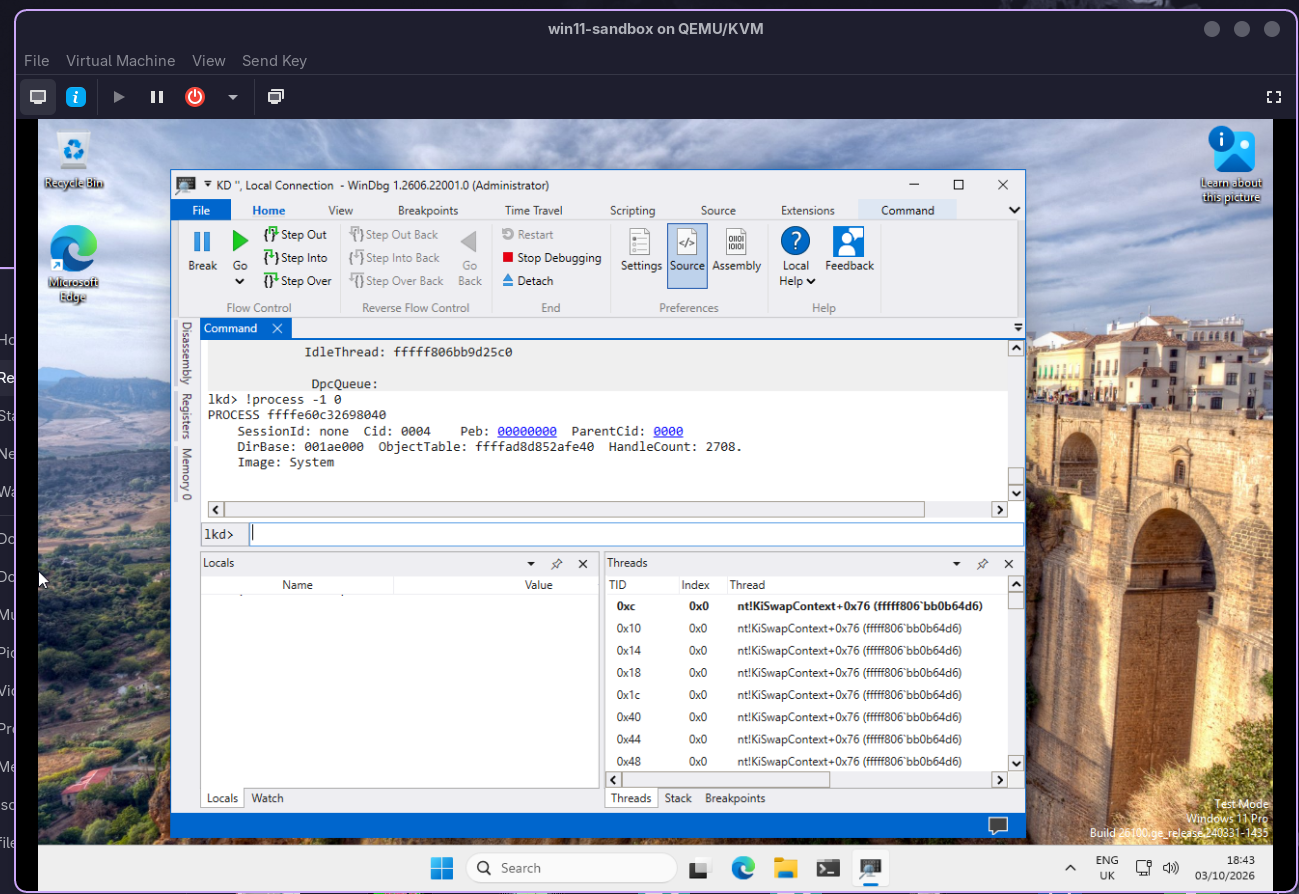
Now we have all the values we need to use our virtual to physical address translator in the context of our kernel address space. This looks like the below.
1
2
3
4
5
6
7
8
9
10
11
12
13
14
15
16
17
18
19
20
21
22
23
24
25
26
27
28
29
30
31
32
33
34
35
36
37
38
39
40
41
42
43
44
45
46
void *resolve_va_to_pa(struct qvmi_os_instance *os_instance, struct qvmi_proc_instance *proc_instance, void *virtual_address)
{
    uint64_t pml4_table = (uint64_t)proc_instance->dtb & 0x000ffffffffff000ULL;

    uint64_t pml4_index = ((uint64_t)virtual_address >> 39) & 0x1FF;
    uint64_t pdpt_index = ((uint64_t)virtual_address >> 30) & 0x1FF;
    uint64_t pd_index = ((uint64_t)virtual_address >> 21) & 0x1FF;
    uint64_t pt_index = ((uint64_t)virtual_address >> 12) & 0x1FF;

    PAGE_TABLE_4K_ENTRY pml4_entry;
    qvmi_read_phys(os_instance, (void *)(pml4_table + pml4_index * 8), &pml4_entry, sizeof(PAGE_TABLE_4K_ENTRY));
    if (!(pml4_entry.bits.Present))
        return 0;

    uint64_t pdpt_table = pml4_entry.value & 0x000ffffffffff000ULL;

    PAGE_TABLE_4K_ENTRY pdpt_entry;
    qvmi_read_phys(os_instance, (void *)(pdpt_table + pdpt_index * 8), &pdpt_entry, sizeof(PAGE_TABLE_4K_ENTRY));
    if (!pdpt_entry.bits.Present)
        return 0;

    uint64_t pd_table = pdpt_entry.value & 0x000ffffffffff000ULL;

    PAGE_TABLE_4K_ENTRY pd_entry;
    qvmi_read_phys(os_instance, (void *)(pd_table + pd_index * 8), &pd_entry, sizeof(PAGE_TABLE_4K_ENTRY));

    if (!pd_entry.bits.Present)
        return 0;

    if (pd_entry.bits.AvabilableHigh)
    {
        uint64_t page_frame = pd_entry.value & 0x000ffffffffff000ULL;
        return (void *)(page_frame + ((uint64_t)virtual_address & 0x1FFFFF)); // offset within 2MB page
    }

    uint64_t pt_table = pd_entry.value & 0x000ffffffffff000ULL;

    PAGE_TABLE_4K_ENTRY pt_entry;
    qvmi_read_phys(os_instance, (void *)(pt_table + pt_index * 8), &pt_entry, sizeof(PAGE_TABLE_4K_ENTRY));
    if (!pt_entry.bits.Present)
        return 0;

    uint64_t page_frame = pt_entry.value & 0x000ffffffffff000ULL;

    return (void *)(page_frame + ((uint64_t)virtual_address & 0xFFF));
}
There are many fantastic resources that go into depth about how paging works on a windows platform. A fantastic one is here https://connormcgarr.github.io/paging/ which explores the topic deeply.
Now that we have the above we can also create a function to read virtual memory with the below.
1
2
3
4
5
6
bool qvmi_read_virt(struct qvmi_os_instance os_instance, struct qvmi_proc_instance proc_instance, void virtual_address, void buffer,
                    size_t size)
{
    void *physical_address = resolve_va_to_pa(os_instance, proc_instance, virtual_address);
    return qvmi_read_phys(os_instance, physical_address, buffer, size);
}
Now we can read any virtual memory address of any process running on our system - provided we have the cr3. However we need a way to obtain all our cr3 values for all our processes. This is where PsActiveProcessHead comes into play. All our processes have a corresponding EPROCESS structure which contains our cr3. The PsActiveProcessHead is a linked list that contains the EPROCESS structure for all our running processes. As such we can loop through to collect this for us using the below function.
1
2
3
4
5
6
7
8
9
10
11
12
13
14
15
16
17
18
19
20
21
22
23
24
25
26
27
28
29
30
31
32
33
34
35
36
37
38
39
40
41
42
43
44
45
46
47
48
typedef struct qvmi_proc_instance
{
uint32_t process_id;
void *dtb; //cr3
void *entry;
char *image_path_name;
} qvmi_proc_instance;
qvmi_proc_instance_list *qvmi_get_proc_instance_list(struct qvmi_os_instance *os_instance)
{
qvmi_proc_instance_list *proc_instance_list = malloc(sizeof(qvmi_proc_instance_list));
LIST_ENTRY list_start;
qvmi_read_virt(os_instance, &os_instance->kernel_proc, os_instance->ntoskrnl.mod.base + PsActiveProcessHead_offset, &list_start,
sizeof(LIST_ENTRY));
LIST_ENTRY current_entry = list_start;
qvmi_proc_instance_list *current_process = proc_instance_list;
do
{
EPROCESS eproc;
qvmi_read_virt(os_instance, &os_instance->kernel_proc, (void *)((uint64_t)current_entry.Flink - 0x1d8), &eproc, sizeof(EPROCESS));
current_process->current.dtb = (void *)eproc.Pcb.DirectoryTableBase;
current_process->current.process_id = eproc.UniqueProcessId;
PEB peb;
qvmi_read_virt(os_instance, ¤t_process->current, eproc.Peb, &peb, sizeof(PEB));
RTL_USER_PROCESS_PARAMETERS user_proc_params;
qvmi_read_virt(os_instance, ¤t_process->current, peb.ProcessParameters, &user_proc_params,
sizeof(RTL_USER_PROCESS_PARAMETERS));
current_process->current.image_path_name =
read_unicode_string(os_instance, ¤t_process->current, user_proc_params.ImagePathName);
qvmi_read_virt(os_instance, &os_instance->kernel_proc, (void *)current_entry.Flink, ¤t_entry, sizeof(LIST_ENTRY));
current_process->next = malloc(sizeof(qvmi_proc_instance_list));
current_process = current_process->next;
} while (current_entry.Flink != list_start.Flink);
current_process->next = NULL;
return proc_instance_list;
}
The above within the library provides a linked list where you can view the process path (on disk), process ID, entry address and our dtb (aka cr3). With this we can now use our aforementioned qvmi_read_virt function to read any virtual address of any process on our system.
In the next blog post we will look into how we find PsLoadedModuleList and PsActiveProcessHead without having to use any tools on our QEMU windows guest virtual machine.